We know that the world is a different place from a few months ago. By acting quickly businesses were able to shift people from offices, and other locations, to work safely from home, but how do you sustain a working environment like this?

We have all been on a journey to what is the ‘new normal’, the below explores the three key phases and technology that will support you to: Stop. Start. Sustain.

Stop.

The way you were working has shifted to home working.

Most people are at this stage; it’s extremely likely that however your organisation was operating before COVID-19, it has fundamentally changed. Employees may now have a laptop and a mobile phone, where previously they had a desktop and a handset on a desk.

They may be working on email fine but have limited access to enterprise apps or shared files. You might also be fortunate enough to have some unified communications (UC) tools in place already but if not, then keeping people connected and productive might already feel a little strained.
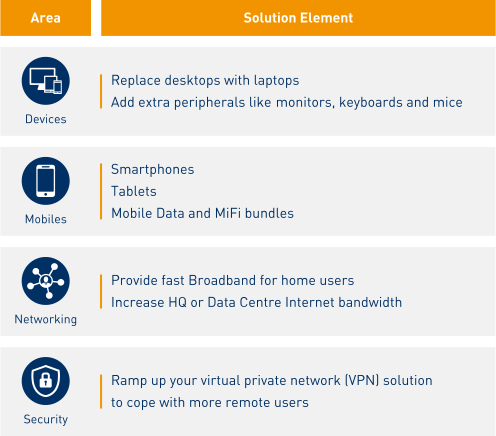
stop start sustain home working table

Start.

Moving towards the longer term, more productive home working.

So, having stopped your normal working environment because of COVID-19, pivoted, and got your employees safely working at home, where do you go from here?

Access to all your organisations’ tools and files, exactly as if your homeworkers were sat at one of your sites, has to be a priority. This will allow them to be as productive as possible for the duration they’re working remotely.

There are two ways you can go about this:

Soft Touch.

Firstly, you will need to look at increasing capacity of existing networks and applications that do not require additional equipment or on-site activities.

For example:

  1. Increase centralised Internet bandwidth to meet the demand for additional remote users
  2. Enable VPN features for existing firewalls
  3. Increase licences for existing VPN solutions

Semi-Soft Touch.

Next, evaluate solutions that may require additional equipment but do not require on-site expertise i.e. cloud managed with zero-touch provisioning.

For example:
  1. Additional teleworker telephony handsets
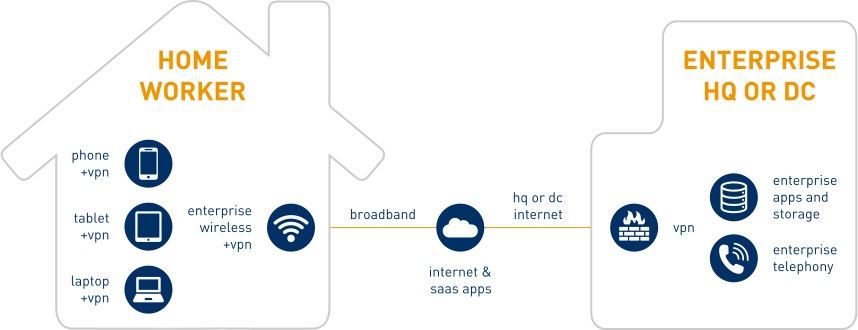
    Teleworker is where you can extend your organisations enterprise phone functionality to a location outside of your buildings. In this case, this will be an employee’s home.
  2. Increase unified communications (UC) collaboration licences
    There are lots of options for free short-term UC tools at the moment –from Microsoft Teams and Mitel MiTeam, to Cisco Webex, Avaya Spaces and Gamma Collaborate. Even if you are not using these tools now, they can be deployed remotely and connect your employees.
  3. Extending existing enterprise wireless to homeworkers
    By using solutions such as Cisco Meraki, you can extend your enterprise-level WiFi to a location outside of your buildings. In this case, this will be an employee’s home – just like a teleworker solution.
  4. Extending existing SD-WAN solution to homeworkers
    If you have SD-WAN deployed already, you can turn that broadband connection at someone’s home into an extension of your enterprise wide area network (WAN). You can read more on our Cisco Meraki WAN solutions here >>

stop start sustain diagram

Sustain.

Your employees working from home, safely and securely.

Once you have done all you can with the tools you have, and those that can be deployed, you need to be able to sustain that environment beyond the immediacy of COVID-19 both safely and securely.

You will be in one of two positions:

  1. You will have the beginnings of a scalable, secure infrastructure
  2. You won’t

When we say scalable infrastructure we mean the ability to extend all of the tools and applications that make your organisation what it is to an employee’s home. For example:

  1. Cisco Meraki WiFi
    Using Cisco Meraki access points and cloud-managed access, you can extend your corporate network wherever you need to – even your employees home – without the need to send anything but an access point to their front door.
  2. Palo Alto Virtual Firewalls
    No need for any additional equipment, you can deploy enterprise-grade secure connectivity whether it is across public, private or hybrid cloud, where deploying hardware firewalls is difficult or impossible.
  3. Microsoft 365
    You might have looked into, or even taken up, a free Microsoft 365 trial during this period but do you now want to make that the default way your organisation uses the Microsoft Office suite?
  4. Cisco Umbrella
    Protect your employees wherever they are by extending enterprise web filtering to their home. Protect them against phishing, malware, botnets, and other cybersecurity threats. If you are using Cisco Meraki WiFi already, Umbrella deploys instantly across a Meraki WiFi network to protect users from Internet threats with no added latency.

Provision and suitability of your VPN and other security solutions are going to be key here – you are going to have a lot of devices legitimately trying to access your network from a variety of remote locations. So you are going to have to be even more aware and prepared for illegitimate access requests and potential vulnerability exploitations.

This sustainability phase will need you to assess what you have achieved in the previous two phases, assess if they are appropriate for your organisation, and whether you need to adapt. Getting everyone able to do something from home in the Stop phase was great, but is it giving you that enterprise-level of productivity and security that you need?

If you are in the category that currently has no scalable, secure infrastructure in place, you will need to start thinking long-term in the short-term. The unthinkable has already happened, preparation is going to be everything.

Don’t end up as a security statistic; stay home, stay safe, sustain home working.

Need some help working out what to do next? Get in touch and we’ll help you create a mid- to long-term strategy to meet the challenges that every organisation is now facing.

Get in Touch

Book your free consultation* today and help us put together your perfect homeworking solution


*Terms & Conditions Apply

Working with the best to deliver the best

  • Asigra
  • VMware
  • Cisco
  • Citrix
  • Dell
  • Symantec
  • Microsoft
  • Veeam
  • NetApp
  • Mitel
  • MaaS360

Check out our latest deals…

Hardware Offers


UC & Mobile Offers

Training and Support

Security and Backup

*T&Cs Apply

Find out how Daisy can help you design and build your perfect flexible working solution

Enable office staff to connect remotely and securely to their usual desktop from anywhere. Or relocate your most critical office-based staff to one of our fully-equipped BC centres. Talk to us about CloudBridge, Business Continuity Management (BCM), Shadow-Planner, Safe Haven, Work Area Recovery (WAR), Backup.
Deliver completely reliable services, security and care to employees wherever they are – at home, out and about or in the workplace. Plus, ensure they stay connected to sensitive information by ensuring secure access. Talk to us about Mobile Device Management (MDM), plus some great deals on devices!
Ensure your network is superfast, well-connected to the Internet, reliable and secure – wherever your users are. Talk to us about Access – Ethernet, Broadband, MPLS and SD-WAN, Hosted Firewall, DDoS Protection and Advanced Threat Management.
Deploy applications that enable your teams to communicate and collaborate simply and securely at all times. Talk to us about Teams, IM, messaging, audio and video conferencing.
Provide a safe and secure online experience for all wired and wireless users, with the ability to control the content available across a variety of profiles and policies. Talk to us about Managed LAN, WiFi Engage, Connect and Protect.